Tailwind SaaS Landing Page Templates: Astro, Next.js and Plain HTML Compared (2026)
What Astro, Next.js and plain HTML each give a SaaS marketing site, and nine Tailwind SaaS landing page templates across the three, free and paid.
Search “tailwind saas template” and you get a wall of screenshots that all look launchable, and not one roundup tells you the thing that matters before the design: what stack the template is in, and whether that stack is the one you want to maintain for three years.
The Tailwind part is the same everywhere. It is a set of utility classes and it does not care what generates the HTML. What differs is the framework around it, and that decides your build tooling, your hosting, who can edit the site, and how much JavaScript your visitors download. So this guide sorts by stack first, then lists nine templates across the three, four of which are ours.
Three stacks, one design language
Astro. A framework for content sites. Components on the server, plain HTML out, JavaScript only where you opt in. Builds are fast, hosting is free anywhere that serves static files, and a marketing site on Astro is about as light as a page can be. The cost is a build step: you run a command before you deploy, and content lives in a config or Markdown rather than in the page.
Next.js. A React framework. The right pick when your marketing pages and your product share a codebase, or your team is React through and through. You get the same components, the same routing, one deploy. The cost is weight and complexity: React ships to the browser on every page, and the framework is built for applications, so a five-page marketing site carries tooling it does not need.
Plain HTML. Files you open in a browser. No build, no framework, no dependencies. The right pick for an agency that hands off static files, a founder who does not want tooling, or a site that will be dropped into a CMS later. The cost is repetition: change the header and you change it in every file.
| Astro | Next.js | Plain HTML | |
|---|---|---|---|
| JavaScript to the browser | Almost none by default | React runtime on every page | Whatever you add |
| Build step | Yes, one command | Yes, one command | No |
| Hosting | Static, free anywhere | Vercel is easiest, static export possible | Any web host |
| Content in one place | Yes, config and Markdown | Yes, code or a CMS | No, per page |
| Fits inside a product codebase | No | Yes | No |
| Who edits it | Developer, or a visual builder | Developer | Anyone with an editor |
The templates
Astro
Daymark (ours). Daymark is the warm one: Noto Serif headlines, soft neutral surfaces, a persimmon accent with three other presets, and light and dark modes. Features, pricing with a monthly and annual toggle, customers, team, a blog and a changelog, 17 page templates in all. On Astro 7 and Tailwind CSS v4, $49, HTML edition $29, and an EmDash CMS edition if a non-developer will edit it.
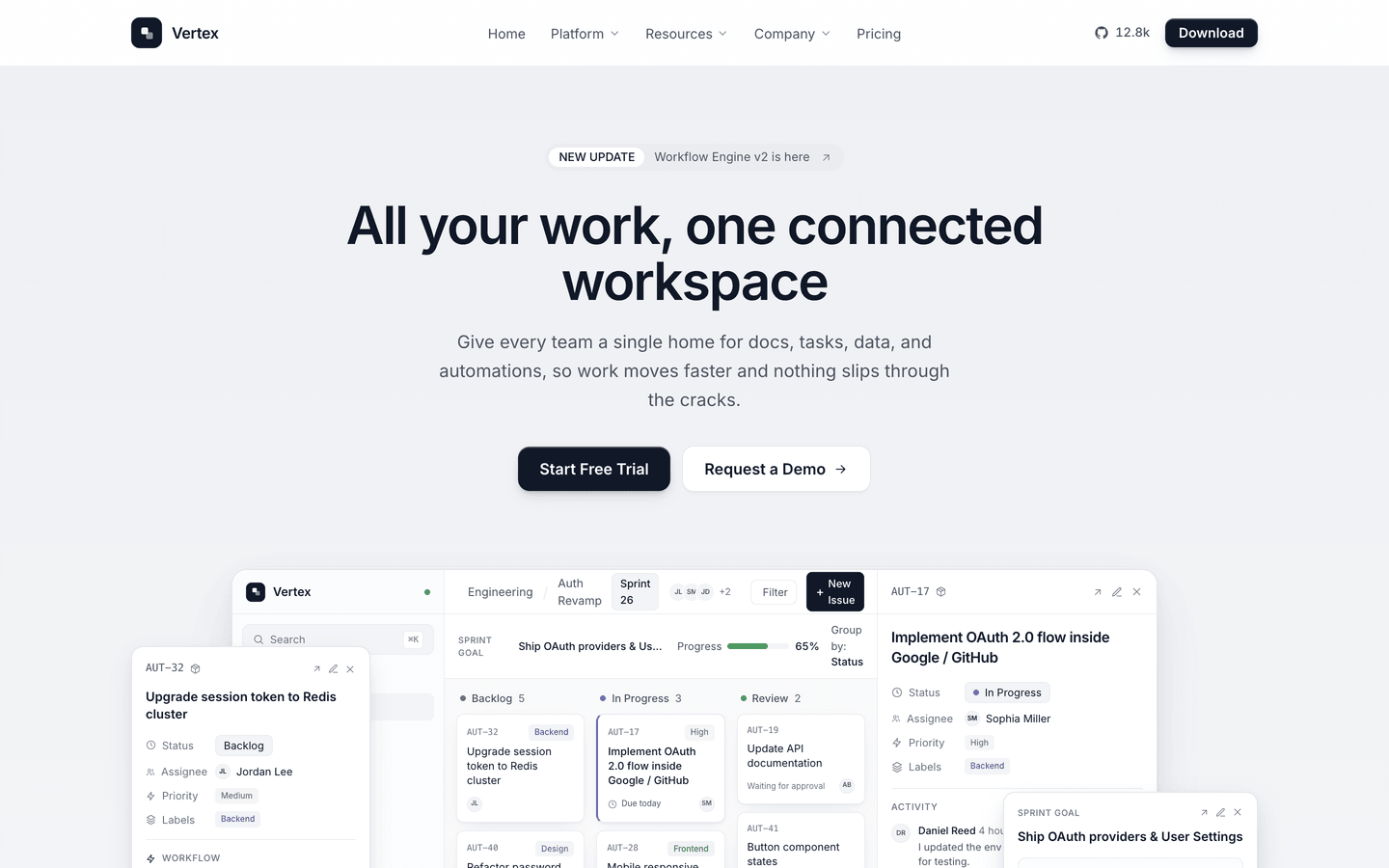
Vertex (ours). Vertex is a near-monochrome SaaS system: ink on off-white, black buttons, and a run of live CSS product mockups that carry the product tour without image assets. Fifteen page templates including pricing, customers, a changelog and a blog. It is the theme our SaaS buyers pick most, on Astro 7 and Tailwind CSS v4, $49, HTML edition $29.
Slab (ours). Slab is for products with an opinion. Neo-brutalist, 3px borders, hard shadows, a clashing flat palette and buttons that press into their shadow. A fake product window in the hero with a live-looking chart. Ten pages. If your competitors all look the same, this is the one that does not.
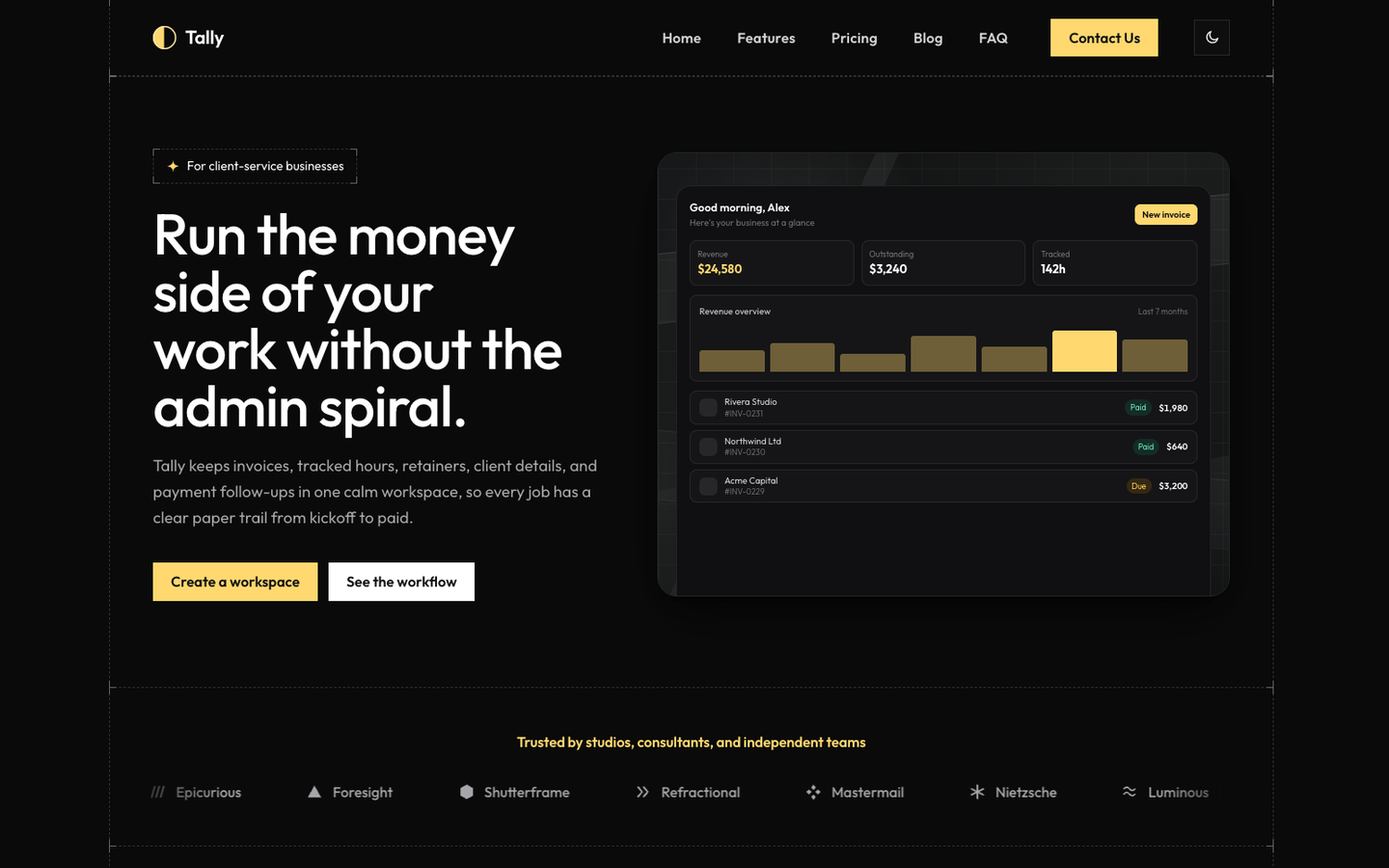
Tally (ours). Tally is the calm one. Blueprint-style frame, dark and light modes, a warm configurable accent, detailed CSS app mockups. Fifteen pages, same structure as Vertex, different temperament. Good for CRMs, analytics, vertical SaaS, anything that should feel like software people already trust.
AstroWind (free). AstroWind is the most-used free Astro template, maintained on Astro 7 and Tailwind CSS v4, with a SaaS homepage variant among several. General purpose and unopinionated, which means the design work is yours.
Next.js
Cruip Relay ($79). Cruip sells Tailwind templates coded in HTML, React, Next.js and Vue. Relay is their dark, developer-first SaaS marketing template. Cadence and Flux, also $79, are the lighter, motion-led alternatives. Cruip’s range runs $49 to $129 and their Next.js editions are the safest paid option if you are in that stack.
Magic UI templates (free). Magic UI publishes free Next.js and Tailwind landing pages, including the AI agent template covered in the AI landing page guide. Animation-heavy, dark mode, quick to start.
AI Tool by NextJS Templates (free). A free Next.js 16 starter from NextJS Templates with SEO, payments and a CMS wired in. More product skeleton than landing page, which is the right shape if marketing and app share a repo.
Plain HTML
AeroLaunch HTML editions ($29, ours). Every AeroLaunch SaaS theme above ships as a plain HTML edition: the same design as finished static pages, no build, no framework. $29 each, or every edition in the HTML bundle for $79. The free themes, Aurora and Spark, include their HTML editions at no cost. The HTML templates guide covers what to look for in the format.
Colorlib (free). Colorlib maintains a large library of free HTML templates, including a Tailwind SaaS set. Quality varies, licences are permissive, and they are the fastest way to get something on a screen if the design will be replaced later.
Choosing, in order
- Where will the marketing site live? Inside the product’s Next.js app: Next.js template, stop here. On its own: continue.
- Is there a build step in your life already? Yes: Astro, it is lighter and cheaper to host than anything else. No, and nobody wants one: plain HTML.
- Who edits it after launch? A developer: any of the above. A non-developer: an Astro theme in the visual builder, which edits every section in the browser and exports the project. A person with a text editor and patience: HTML.
- Then, and only then, pick the design. The Tailwind classes are the same. The design that survives the stack decision is the right one.
The mistake to avoid
Buying the design first and discovering the stack second. A Next.js template does not become an Astro site by copying the classes, and an HTML template does not become a Next.js app by wrapping it in a component. Every week someone writes to us having bought a beautiful template in the wrong stack. That is the whole reason our themes ship in more than one edition: pick the design once, choose Astro or HTML when you know who is running it.
Frequently asked questions
Which stack should a SaaS landing page use? +
If the marketing site is its own thing, Astro: least JavaScript, fastest builds, free hosting anywhere. If the marketing pages live inside the product's Next.js app, Next.js. If you have no build tooling and want to open a file in a browser, or you are handing it to an agency that works in raw HTML, plain HTML. The Tailwind classes are the same in all three, so the design does not decide this; the team does.
Are Tailwind SaaS templates free? +
Some. AstroWind is free for Astro, Magic UI's templates are free for Next.js, and Colorlib publishes free HTML templates. AeroLaunch's Aurora and Spark are free Astro themes and each includes an HTML edition. Paid templates from Cruip run $49 to $129, and AeroLaunch Astro themes run $39 to $59 with HTML editions at $29.
What is the difference between an Astro theme and an HTML template? +
An HTML template is finished pages you edit directly, with repeated parts like the header duplicated in every file. An Astro theme is source that generates those pages from components and a config, so the header is one file and content lives in one place. Astro needs a build step; HTML does not. AeroLaunch ships both editions of most themes, so you can pick by workflow rather than by design.
Can I use a Next.js template on Astro, or the other way round? +
Not without rewriting the components. The Tailwind classes move over, the component model does not. If you are undecided, choose the stack first and then the template, or pick a design that ships in more than one edition.
Do I need Tailwind CSS v4 or v3? +
New projects should be on v4. It is faster, has no config file by default, and the templates released in 2026 target it. A v3 template still works but you inherit an upgrade. Check the version before buying; it is usually in the changelog or the package file.
Start from a production-ready Astro theme
Skip building the design from scratch. These themes are full Astro 7 + Tailwind v4 projects you own outright - and you can edit them visually, no code, with the AeroLaunch builder.