Mend
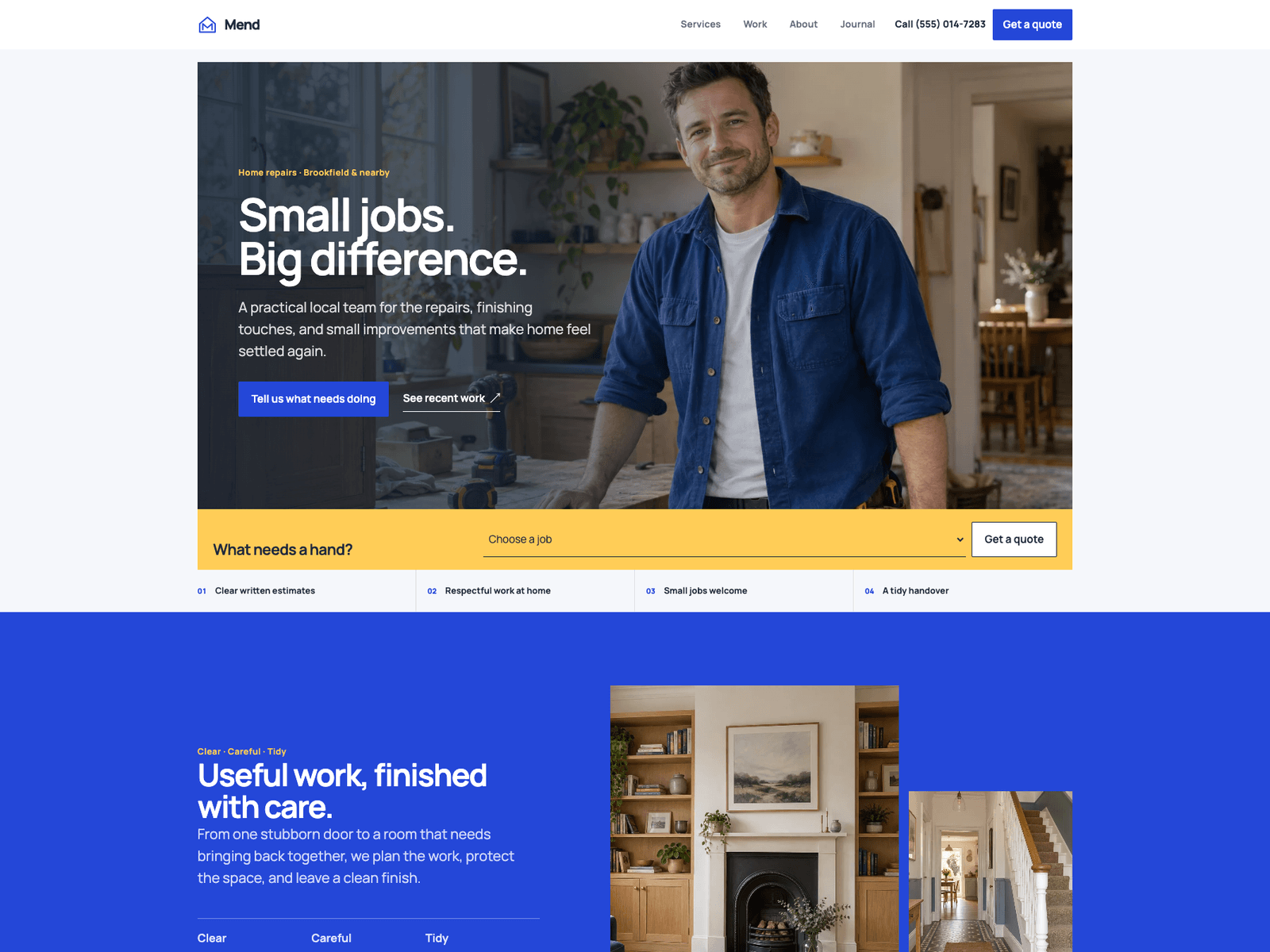
A bright, practical theme for trades and local service businesses. A quote-starting job slip, a draggable before/after comparison, six service pages, project stories, service areas, and an optional journal.
Editions: Astro (source), HTML (plain files, no build).
One payment for Mend and everything else - all 33 themes, every future release, and the Astro visual builder included.
See Mend in action
Every page and section is part of the download. Use these as launch-day templates - keep the structure, swap the copy.
Mend is built for trades and local service businesses that quote by the job, from repair and maintenance teams to carpenters, painters, and fitters. The demo shows a home-repair team handling a sticking door, a wall that needs fixings, shelves for an empty alcove, and a hallway that needs a fresh coat. The design is bright and straightforward, with Manrope typography, a cobalt and pale-blue palette, and a golden job slip in the hero that lets a visitor pick a job and land on the quote form with it already chosen. A draggable before/after comparison shows the difference the work makes, and it works with a keyboard as well as a pointer. Six service pages, three project stories, a service-areas page, an about page with the team, reviews, an FAQ, and an optional paginated journal give a local business a complete site rather than a single page. Every business detail, interface string, palette colour, review, FAQ, area, and legal placeholder lives in src/config/site.ts, and any service, project, or article can be overridden there too, so all visible edits can happen in one file. Services, projects, and articles also stay convenient to write as Markdown. Locale-ready routes, nine original photographs, and included AGENTS.md and CLAUDE.md files make it straightforward to adapt.
Best Fit For
- Trades and contractors
- Home repair and maintenance teams
- Carpenters, painters, and fitters
- Local service businesses that quote by the job
Full Page Set
Every page is real and editable - no placeholders, no "coming soon" stubs.
14 Sections Included
Every section is a ready-to-use Astro component. Add it to any page, customize via config, or remove what you don't need.
What's Included
Built around getting the quote
The golden job slip in the hero asks what needs a hand, lets the visitor pick a job, and opens the quote form with that service already selected. Service pages link to the same form, and the demo mode says clearly that no message was sent until a real provider is connected.
Show the difference, not just describe it
A before/after comparison lets visitors drag across a room to see the result. It also works with the keyboard, and it sits beside plain-language proof and real project stories with their own pages.
A complete site for a small business
Six service pages, three project stories, an about page with the team, a service-areas page, reviews, an FAQ, and an optional journal give a local business everything it needs to look established from day one.
Every visible edit in one place
Business details, interface copy, palette, reviews, FAQs, areas, and legal placeholders live in site.ts, and any service, project, or article can be overridden there as well. Prefer Markdown? The same content stays editable as ordinary Markdown files.
Tech Stack
Config-Driven Setup
Mend keeps business details, the palette, interface copy, reviews, FAQs, service areas, legal placeholders, and form settings insrc/config/site.ts. Project and article prose stays in Markdown content collections.
// src/config/site.ts
export const siteConfig = {
  content:    { overrides: { services: {}, projects: {}, blog: {} } },
  identity:   { name: "Mend", url: "https://example.com", ... },
  business:   { phoneDisplay: "(555) 014-7283", address: {...}, hours: [...] },
  appearance: { palette: { cobalt: "#2447D8", yellow: "#FFCD57", ... } },
  hero:       { heading: "Small jobs.\nBig difference.", slip: {...} },
  comparison: { before: "/images/before-entry.webp", after: "...", ... },
  areas:      { items: [...] },
  reviews:    { items: [...] },
  faq:        { items: [...] },
  journal:    { enabled: true, pagination: { pageSize: 2, ... } },
  contact:    { form: { provider: "demo", formspreeId: "", ... } },
} as const;Built to be edited by AI
Mend ships an AGENTS.md and
a CLAUDE.md at the project root.
Claude Code, Cursor, Copilot, and Codex read them the moment you open the folder.
So your agent starts knowing which file to edit, which design decisions are deliberate, and which parts of the theme break quietly if touched. You get the right change on the first pass instead of a confident guess.
- A task map. Every common request routed to the exact file, so no time is spent exploring.
- Design invariants. The decisions that make the theme worth buying, marked do-not-touch.
- The traps. The specific things that break this theme silently, written down.
- A done checklist. What to build, what to scroll, what to verify before claiming success.
# Mend agent guide

- site.ts owns identity, business details, palette, motion,
  navigation, interface copy, form settings, SEO, areas,
  reviews, FAQs, legal placeholders, and pagination.
- src/content/services/, projects/, and blog/ hold the
  Markdown defaults; content.overrides in site.ts can
  replace any entry by its slug.
- Keep canonical routes and locale mirrors in sync.
- journal.enabled removes journal navigation and routes.
- Keep the quote form in honest demo mode until a provider is set.
- Preserve keyboard controls, reduced motion, focus,
  and the AeroLaunch credit.

Before completion run npm run check, npm test, and npm run build.
Excerpt. The full file ships with the theme.
The same design as plain HTML
No Astro, no npm, no build step. Unzip the folder, open index.html straight from your disk and it works. Every page is a plain .html file you edit in any editor, the styling lives in one readable CSS file with the colours at the top, and an optional Tailwind folder is there if you want utility classes back. Deploy it to any static host: Netlify, Cloudflare Pages, GitHub Pages or plain cPanel.
More themes from the collection.
Slab
SaaS / Startup
Vertex
SaaS / Startup
Tally
SaaS / Startup
Falcon
Agency / Portfolio / Blog
Or get every theme - these included - with the All-Access Pass.